

Why every Divi designer should have a system?
If you’ve ever finished a website, handed it off, and then spent the next three months making tweaks because “can we just change this blue everywhere?” — you already understand why design systems exist.
They exist to save you from exactly that.
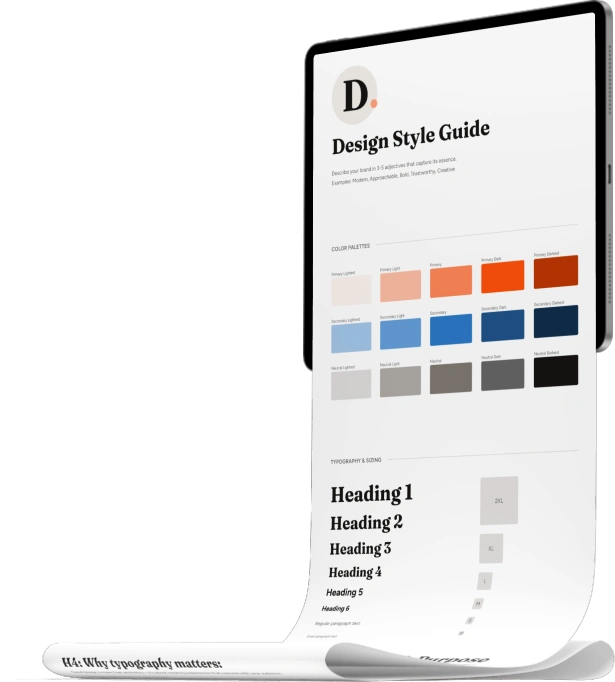
But, what actually is a design system?
A design system is a set of decisions you make once and then reuse consistently across every page of a website.
At its core, it includes:
Color palette with defined roles (not just “blue” – primary, secondary, neutral, accent, with variations)
Typography – which fonts, which sizes, and when to use each
Spacing rules – how much padding, how much gap between sections
Component styles — how buttons look, how cards are structured, how forms and toggles behave
That’s it. Not a complicated concept. The hard part is actually sticking to it — especially when you’re building in a visual editor like Divi, where it’s tempting to just “quickly change this one thing” and suddenly your site has 14 slightly different shades of the same blue.
Why you need this even as a solo freelancer
Design systems have a reputation for being a “big team” thing. Google has Material Design. Apple has Human Interface Guidelines. But solo designers and small studios need them just as much — for different reasons.
Reason 1: Speed on every new project
Once your design system exists, you don’t start from zero. Colors are picked, font sizes work, button styles are ready. The decisions are already made. You just build.
Reason 2: Consistency without thinking about it
Inconsistency creeps in when every design decision is made fresh in the moment. A system makes it almost impossible to drift — because you’re always pulling from the same source.
Reason 3: Client changes take seconds, not hours
This is the big one. When a client wants to change their primary color, you change it in one place and it updates everywhere. Not on most pages. Everywhere.
Reason 4: You stop second-guessing yourself
Decision fatigue is real. A design system answers the micro-questions in advance — what size is this heading? how much spacing here? — so you can just build.
How a design system works in Divi 5
Here’s where it gets practical and honestly quite exciting.
Divi 5 has a feature called global variables — and this is the foundation of building a real design system inside Divi.
Instead of typing a hex color every time you want your primary blue, you define your global Primary Color variable and then anywhere in Divi where you’d normally type a value, you use dynamic content to pull in that variable instead.
When the client wants a different blue? You change one variable. Every element referencing it updates automatically.
You do this for colors, fonts, and also for numbers — sizes, spacing values, anything that repeats.
The part that makes it truly powerful: fluid values with clamp
This is where Divi 5’s design system gets really interesting.
For number variables — font sizes, spacing, padding — you don’t have to enter a fixed pixel value. You can use a CSS clamp() function instead, which means the value scales fluidly between a minimum (mobile) and maximum (desktop) based on the viewport width.
For example, instead of a heading being fixed at 48px everywhere, it might be:
clamp(28px, 4.5vw, 48px)Which means: never smaller than 28px, never larger than 48px, and perfectly fluid in between.
The practical result: you define one value and it works on all screen sizes. No adjusting at the tablet breakpoint. No tweaking on mobile. Set it once, it works everywhere.
And here’s something that makes Divi 5 genuinely stand out: it has a built-in variable generator that calculates these clamp values for you. You set your minimum and maximum viewport widths, choose your size range, and Divi generates a complete fluid typography scale or spacing scale — ready to paste straight into your variables. No manual math, no external calculators needed.
For a complete design system, you’d define clamp values for:
- Every heading size (H1 through H6)
- Your body text size
- Spacing values (small, medium, large, extra large) for padding and gaps between sections
A look at the color system
The number side is one thing, but the color system in Divi 5 also has a trick up its sleeve: relative colors.
When you define a primary color, you don’t have to manually pick a light version and a dark version and then maintain all three separately. Divi 5’s built-in variable generator lets you create color shades and tones automatically — lighter and darker variants calculated from your base color using HSL relationships.
So your full primary color system might look like:
- Primary (your main brand color)
- Primary Light (auto-calculated, lighter version for hover states or backgrounds)
- Primary Dark (auto-calculated, darker version for text on light backgrounds)
Change the primary, and the light and dark variants update with it. Your whole palette stays in sync.
Add secondary colors and neutral grays built the same way, and you have a complete, coherent color system with very few values to manage.
What the workflow actually looks like
Once variables are defined, using them in Divi is simple. In any design setting where you’d normally type a value — a font size, a color, a spacing amount — you pull in a variable via dynamic content instead.
Then you take it a step further with option group presets. These are reusable style combinations: a heading style, a body text style, a button style, each one referencing your variables. Apply a preset to any new element and it inherits your whole system instantly.
The result is a starter template — a Divi page you can export as a JSON file and import into every new project. Update the brand colors and fonts, and your foundation is set in minutes.
What a design system is NOT
It’s not a rigid rulebook. It’s a set of defaults that eliminate friction, not a cage.
It also doesn’t have to be elaborate. For a freelancer building client sites in Divi, your whole design system can live in:
- One Divi page with your variables defined and a few preset sections
- A short reference sheet with your color names and font sizes
Start there. That alone will save you hours on every project.
Want to build one from scratch, step by step?
I built a mini course on exactly this – Divi Design System in 7 Steps – where we go from picking your color palette all the way to a complete, exportable Divi starter template you reuse on every project.
Have you started building with a design system yet? Come share your experience in the comments – I’d love to hear where you’re at.





Ania,
Yes I do have a system in place. I call mine a style guide. Covers the areas you mentioned in your article.
It is great for myself and if I ever use an outside agency I hand it to them. Everybody on the same page. (Except those that insist on forcing me to take on their style guides!)
My site is undergoing a rebuild.
Cheers.