Updated for Divi 5: I tested the code on a Divi 5 site and it works without changes. Divi 5 still loads jQuery and still has Divi → Theme Options → Integration, so the steps are the same in Divi 5 and Divi 4. I only added one optional line for visitors who prefer less motion.
Add a fun heart cursor trail to your Divi site
Valentine's Day is almost here! ❤️ And whether you love it or just tolerate the heart-shaped madness, we can all agree on one thing: once a year, a little bit of extra sparkle and playfulness doesn't hurt.
Now, I'm not saying you should flood your site with pink gradients and autoplaying romantic ballads (please, don't do that). But if you're feeling even a tiny bit festive, I've got a simple, fun CSS + jQuery trick for you: a floating heart cursor effect that adds just the right amount of Valentine's vibes without going overboard.
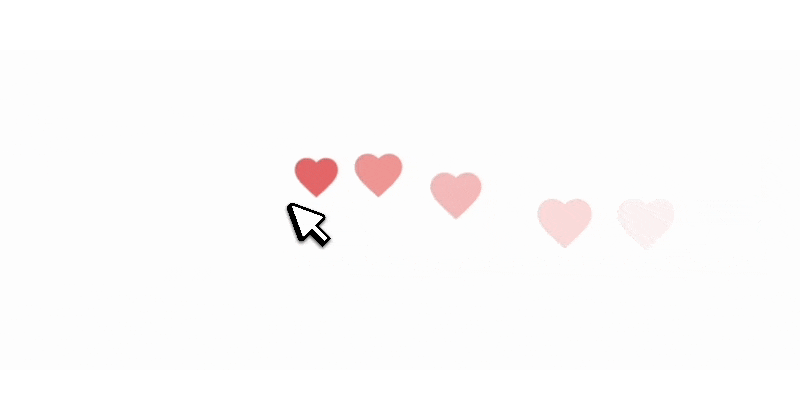
Here's a quick preview of how it looks in action:

How to add the floating hearts cursor effect in Divi
You need two small pieces of code: a jQuery script that creates a heart SVG wherever the mouse moves, and CSS that makes each heart float up and fade out. No images or plugins needed, and it works in Divi 5 and Divi 4.
Step 1: Add the jQuery code
Since the effect relies on creating hearts as the cursor moves, we need a script that listens for mouse movement and adds heart elements to the page.
📌 Go to Divi → Theme Options → Integration and paste the following code into the "Add code to the < body >" field:
<script>
jQuery(document).ready(function($) {
    let lastMove = 0;

    // Define the heart SVG
    let heartSVG = `<svg class='dl-heartbeat' viewBox="0 0 24 24" xmlns="http://www.w3.org/2000/svg">
        <path d="M12 21.35l-1.45-1.32C5.4 15.36 2 12.28 2 8.5 2 5.42 4.42 3 7.5 3c1.74 0 3.41.81 4.5 2.09C13.09 3.81 14.76 3 16.5 3 19.58 3 22 5.42 22 8.5c0 3.78-3.4 6.86-8.55 11.54L12 21.35z"/>
    </svg>`;

    $(document).mousemove(function(e) {
        let now = Date.now();

        // Generate a heart every 300ms (prevents excessive elements)
        if (now - lastMove > 300) {
            lastMove = now;

            let heart = $(heartSVG);
            $("body").append(heart);
            heart.css({
                left: e.pageX + "px",
                top: e.pageY + "px"
            });

            // Remove the heart after animation ends
            setTimeout(function() {
                heart.remove();
            }, 1200);
        }
    });
});
</script>
🔍 What the code does:
jQuery(document).ready(function($) { ... });runs the script once the page is loaded.let heartSVG = ...defines the heart shape as an inline SVG.$(document).mousemove(function(e) { ... })detects cursor movement and creates the hearts.if (now - lastMove > 300) { ... }limits how often hearts appear (once every 300ms) to prevent clutter.$("body").append(heart);adds the heart to the page..css({ left: e.pageX + "px", top: e.pageY + "px" })places the heart at the cursor position.setTimeout(function() { heart.remove(); }, 1200);removes each heart after its animation, to keep the page smooth.
Step 2: Add the CSS for the floating effect
Now we need CSS to style the hearts and make them float upwards before disappearing. 📌 Go to Divi → Theme Options → General → Custom CSS and paste this code:
.dl-heartbeat {
    position: absolute;
    z-index: 999;
    width: 32px;
    height: 32px;
    fill: #e25555; /* Heart color */
    opacity: 1;
    pointer-events: none;
    animation: heartFloatUp 1.2s ease-out forwards;
}

@keyframes heartFloatUp {
    0% { transform: translate(-50%, -100%) scale(1); opacity: 1; }
    100% { transform: translate(-50%, -200%) scale(1.4); opacity: 0; }
}

/* No hearts while you edit the page in the Visual Builder */
body.et-fb .dl-heartbeat {
    display: none;
}

/* No hearts for visitors who turned off animations */
@media (prefers-reduced-motion: reduce) {
    .dl-heartbeat {
        display: none;
    }
}
🔍 What the CSS does:
.dl-heartbeat: the class of every heart SVG the script creates.position: absolute;places each heart exactly where the cursor is, andz-index: 999;keeps it above other elements (adjust if needed).width: 32px; height: 32px;sets the heart size, andfill: #e25555;its color (change it to your brand color).pointer-events: none;makes sure the hearts never block clicks.animation: heartFloatUp 1.2s ease-out forwards;runs the floating and fading animation once.0% { transform: translate(-50%, -100%) scale(1); opacity: 1; }: the heart starts just above the cursor, centered.100% { transform: translate(-50%, -200%) scale(1.4); opacity: 0; }: it floats further up, grows a little and fades out.
The body.et-fb rule hides the hearts while you edit in the Visual Builder (Divi 5 still adds the et-fb class there), and the last rule turns the effect off for visitors who set their device to reduce motion.
Step 3: Save and refresh your site
Click "Save Changes" in Divi Theme Options, refresh your website and move your mouse: you should now see hearts floating behind your cursor! 💖
How to show the hearts on one page only
Put both pieces of code in a Code module on that page instead of Theme Options: the CSS inside <style>…</style> tags, and the jQuery code with its <script> tags. The Code module outputs it as it is, in Divi 5 and Divi 4, so the hearts only appear on that page.
And that's it!
You now have a lightweight, animated floating heart cursor effect in Divi, built entirely with CSS and jQuery. Perfect for Valentine's season, romantic websites, or simply adding a bit of fun to your design! On phones and tablets there is no mouse, so the effect simply doesn't show there.
📢 If you use this effect, share your site in my Divi Lovers Facebook group! I'd love to see it in action!